1. Router
1.1. Router CLI 모드
- Router> : user mode (ping 등 약간의 확인만 가능, 일반 사용자 모드)
- Router# : Privilege Mode 관리자 모드, 특권모드 (Show run 라우터 설정확인, write 저장)
- Router(config)# : 전역 설정 모드, Global Configuration Mode
- Router(config-if)# : 하위 구성 모드 인터페이스 설정 모드
1.2. Router 기본 명령어
user mode (Router>)
- enable : 관리자 모드 진입
관리자 모드 (Router#)
- configure terminal : 전역 설정 모드 진입
- write : 설정 저장 (실행 중인 구성을 메로리, 네트워크 또는 터미널에 저장)
- show running-config : 현재 작동 중인 구성 확인
- erase startup-config : 라우터 설정 초기화
- reload : 중지 및 재시작
전역 설정 모드 (Router(config)#)
- hostname [라우터이름] : 라우터 이름 지정
- enable password [패스워드] : 유저모드에서 관리자 모드 진입 시 password 설정 - 평문
- enable secret [패스워드] : 유저모드에서 관리자 모드 진입 시 password 설정 - 암호문 (평문보다 우선한다)
- no ip domain-lookup : 명령어 잘못 입력 시 domain에서 찾는 과정 생략 (Ctrl+Shift+6)
- service password-encryptions : 모든 평문 패스워드 암호화
- line console 0 : 기본 터미널 라인 구성
- password [패스워드] : 사용자 모드 진입 패스워드 설정
- login : 패스워드 확인 활성화
- exec-time : exec 시간 초과 설정 (ex) exec-time 0 0 : 콘솔 화면 logoff 비활성화)
- logging synchronous : 인터페이스 활성/비활성화 되어도 입력하는 명령어 보존
- interface Fastethernet 0/0 : FastEthernet 0/0 인터페이스 구성
- ip address : ip address 설정
- no ip address : ip address 설정 초기화
- do [관리자 모드 명령어] : 관리자 모드 명령어 관리자모드 아닌 곳에서 실행 가능
- ip route [ip address] : 고정 경로 설정 (Default Static Route는 단 방향만 가능)
1.3. 실습
※ 관리자 모드 진입

※ 전역 설정 모드 진입

※ 라우터 이름 설정 (Seoul_R1)

※ 관리자 모드 진입 시 평문 및 암호화된 패스워드 지정, 평문 패스워드 암호화

※ 패스워드 설정 확인

※ 없는 명령어 입력해도 DNS에서 검색되지 않도록 설정

※ 사용자 모드 진입 시 패스워드 설정 및 패스워드 활성화

※ 콘솔 화면 logoff되지 않도록 설정, 인터페이스 활성/비활성화 되어도 입력하는 명령어 보존되도록 설정

※ FastEthernet 0/0 ip address 인터페이스 설정 및 실행
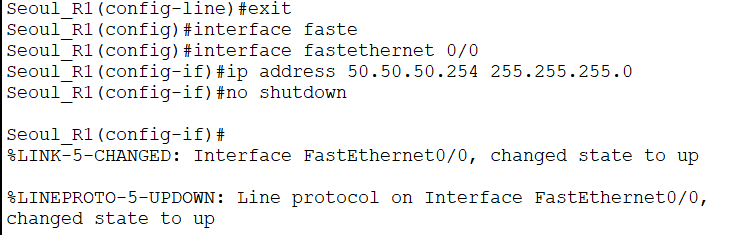
※ 설정 저장

2. 네트워크 구성해보기
2.1. 구성 문제 1
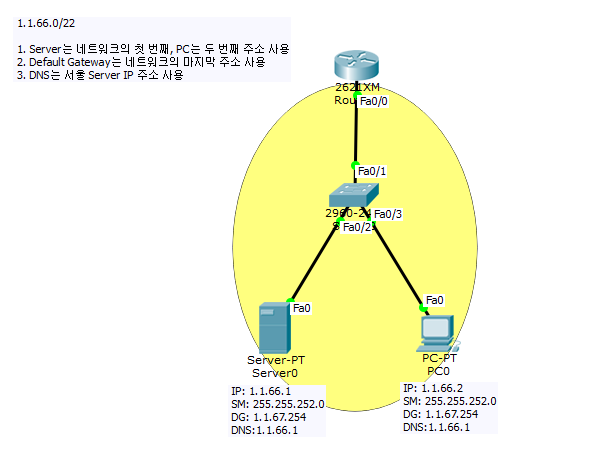
아래 조건에 맞게 구성하기
- 1. host 이름 설정(Seoul_R1)
- 관리자 모드 진입 시 평문 패스워드 babo1
- 관리자 모드 진입 시 암호화된 패스워드 babo2
- 없는 명령어를 입력해도 DNS에서 검색하지 않아야 함
- 모든 평문 패스워드는 암호화
- 사용자 모드 진입 시 패스워드는 babo3
- 콘솔 화면은 logoff 되지 않아야 함
- 인터페이스가 활성, 비활성화 되어도 입력하는 명령어는 보존
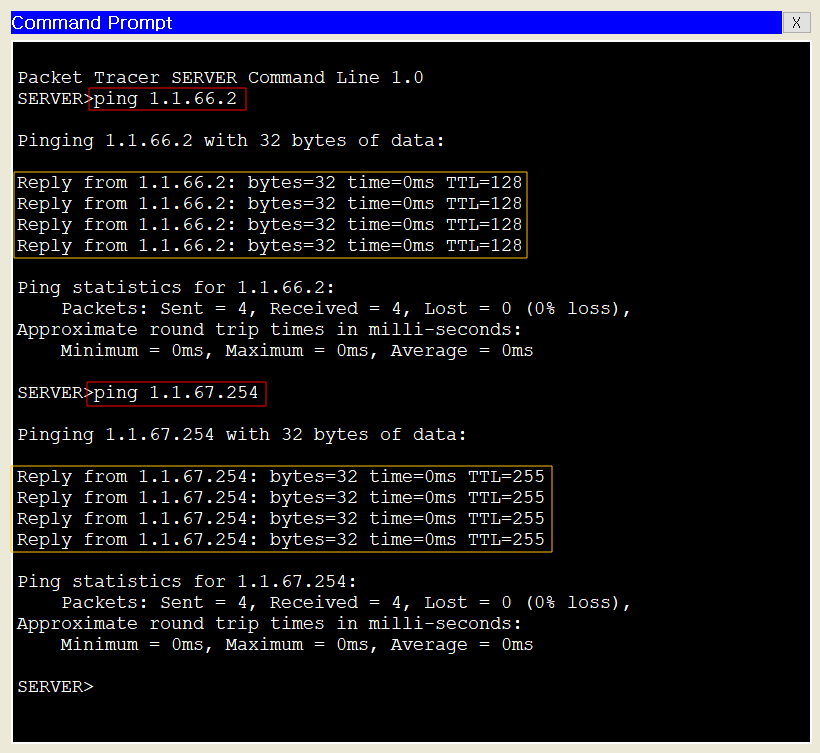
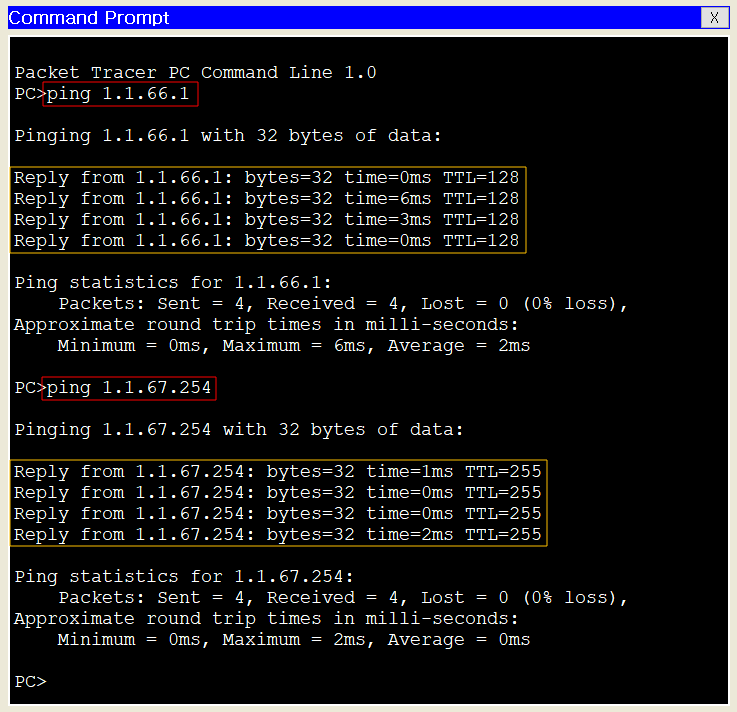
- 서버나 PC에서 게이트웨이로 Ping test가 성공해야 함
- 스위치는 설정하지 않음
서브넷 구하기
| Prefix 22 → 255.255.252.0 256/(256-252) = 64 4개씩 총 64개의 네트워크 1.1.0.0~1.1.3.255 1.1.4.0~1.1.7.255 1.1.8.0~1.1.11.255 1.1.12.0~1.1.15.255 . . 1.1.60.0~1.1.63.255 1.1.64.0~1.1.67.255 (사용 가능 범위 1.1.64.1~1.1.67.254) . . 1.1.244.0~1.1.247.255 1.1.248.0~1.1.251.255 1.1.252.0~1.1.255.255 |
IP Configuration 설정
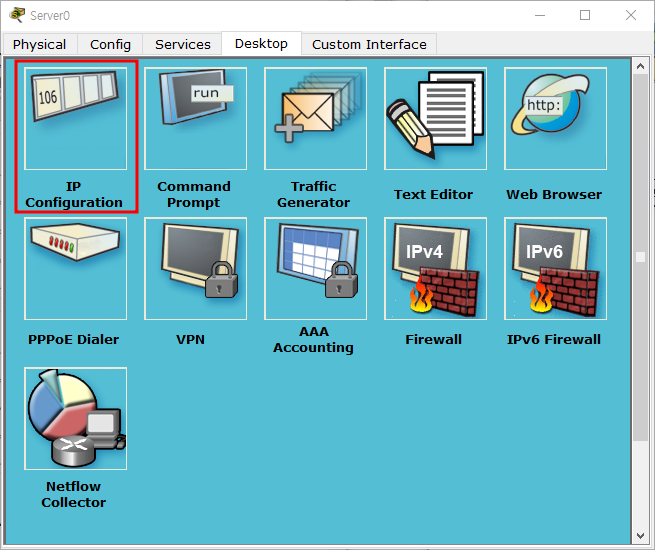
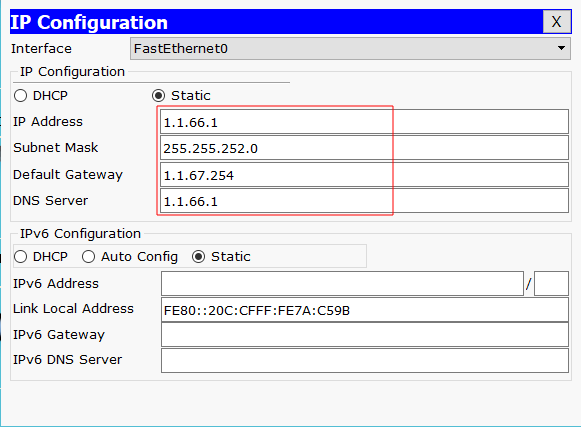
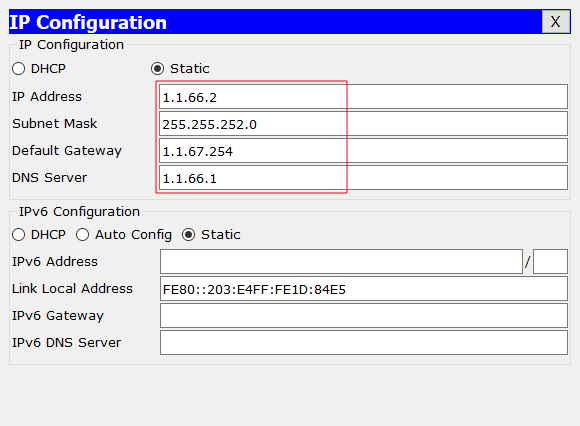
라우터 설정
| Router>en Router#configure t Enter configuration commands, one per line. End with CNTL/Z. Router(config)#hostname Seoul_R1 Seoul_R1(config)#enable password babo1 Seoul_R1(config)#enable password babo2 Seoul_R1(config)#no ip domain-lookup Seoul_R1(config)#service p Seoul_R1(config)#service password-encryption Seoul_R1(config)#line con 0 Seoul_R1(config-line)#password babo3 Seoul_R1(config-line)#login Seoul_R1(config-line)#exec-timeout 0 0 Seoul_R1(config-line)#logging synchronous Seoul_R1(config-line)#exit Seoul_R1(config)#interface FastEthernet 0/0 Seoul_R1(config-if)#ip address 1.1.67.254 255.255.252.0 Seoul_R1(config-if)#no shutdown Seoul_R1(config-if)# %LINK-5-CHANGED: Interface FastEthernet0/0, changed state to up %LINEPROTO-5-UPDOWN: Line protocol on Interface FastEthernet0/0, changed state to up Seoul_R1(config-if)#do write Building configuration... [OK] Seoul_R1(config-if)# |
네트워크 구성 완료
Ping Test
2.2. 구성 문제 2
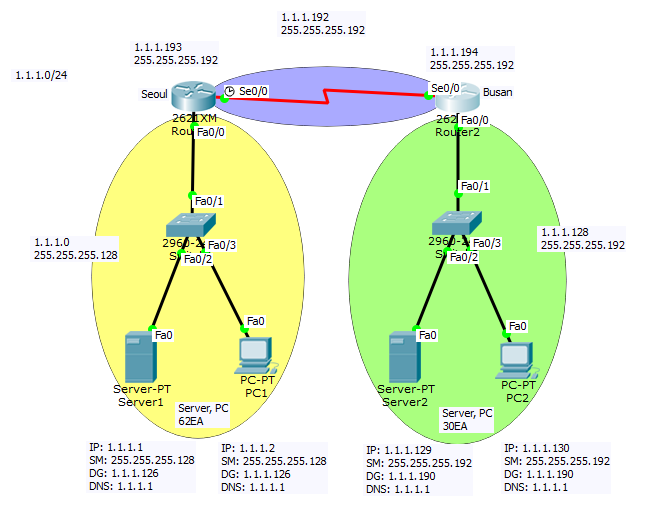
아래 조건에 맞게 구성하기
조건1
- Server는 네트워크의 첫 번째, PC는 두 번쨰 주소 사용
- Default Gateway는 네트워크의 마지막 주소 사용
- DNS는 서울 Server IP 주소 사용
- 각 지역에 먼저 앞쪽 네트워크 할당하고 WAN 구간 네트워크 할당
- 네트워크별로 IP는 최대한 여유있게 구성
조건2
- 조건에 맞게 구성 후 모든 서버와 PC의 Ping이 가능해야 한다.
- host 이름은 대소문자를 구별한다.
- 관리자 모드 진입 시 평문 패스워드 babo1
- 관리자 모드 진입 시 암호화된 패스워드 babo2
- 없는 명령어를 입력해도 DNS에서 검색하지 않아야 한다.
- 모든 평문 패스워드는 암호화해야 한다.
- 사용자 모드 진입 시 패스워드는 babo3
- 콘솔 화면은 logoff되지 않아야 한다.
- 인터페이스가 활성, 비활성화 되어도 입력하는 명령어는 보존되어야 한다.
- 서버나 PC에서 게이트웨이로 Ping test가 성공해야한다.
- 스위치는 설정하지 않는다.
- WAN 구간 Serial Interface의 전송 속도는 최대 값으로 설정한다.
- 라우팅은 Static Routing을 사용한다. Default Static Routing 아님
라우터 설정
[Seoul_R1] Router>en Router#conf t Enter configuration commands, one per line. End with CNTL/Z. Router(config)#hostname Seoul_R1 Seoul_R1(config)#enable password babo1 Seoul_R1(config)#enable secret babo2 Seoul_R1(config)#no ip domain-lookup Seoul_R1(config)#service password-encryption Seoul_R1(config)#line con 0 Seoul_R1(config-line)#password babo3 Seoul_R1(config-line)#login Seoul_R1(config-line)#exec-timeout 0 0 Seoul_R1(config-line)#logging synchronous Seoul_R1(config-line)#exit Seoul_R1(config)#interface FastEthernet 0/0 Seoul_R1(config-if)#ip address 1.1.1.126 255.255.255.128 Seoul_R1(config-if)#no shutdown Seoul_R1(config-if)# %LINK-5-CHANGED: Interface FastEthernet0/0, changed state to up %LINEPROTO-5-UPDOWN: Line protocol on Interface FastEthernet0/0, changed state to up Seoul_R1(config-if)#exit Seoul_R1(config)#inter Seoul_R1(config)#interface serial 0/0 Seoul_R1(config-if)#ip add Seoul_R1(config-if)#ip address 1.1.1.193 255.255.255.192 Seoul_R1(config-if)#clock rate 4000000 Seoul_R1(config-if)#no shutdown %LINK-5-CHANGED: Interface Serial0/0, changed state to down Seoul_R1(config-if)#exit Seoul_R1(config)#ip route 1.1.1.128 255.255.255.192 1.1.1.194 Seoul_R1(config)#do wr Building configuration... [OK] Seoul_R1(config)# %LINK-5-CHANGED: Interface Serial0/0, changed state to up %LINEPROTO-5-UPDOWN: Line protocol on Interface Serial0/0, changed state to up |
|
[Busan_R1] Router>en Router#conf t Enter configuration commands, one per line. End with CNTL/Z. Router(config)#hostname Busan_R1 Busan_R1(config)#enable password babo1 Busan_R1(config)#enable secret babo2 Busan_R1(config)#no ip domain-lookup Busan_R1(config)#service password-encryption Busan_R1(config)#line con 0 Busan_R1(config-line)#password babo3 Busan_R1(config-line)#exec-timeout 0 0 Busan_R1(config-line)#logging synchronous Busan_R1(config-line)#exit Busan_R1(config)#interface FastEthernet 0/0 Busan_R1(config-if)#ip address 1.1.1.190 255.255.255.192 Busan_R1(config-if)#no shutdown Busan_R1(config-if)# %LINK-5-CHANGED: Interface FastEthernet0/0, changed state to up %LINEPROTO-5-UPDOWN: Line protocol on Interface FastEthernet0/0, changed state to up Busan_R1(config-if)#exit Busan_R1(config)#interface serial 0/0 Busan_R1(config-if)#ip address 1.1.1.194 255.255.255.192 Busan_R1(config-if)#no shutdown Busan_R1(config-if)# %LINK-5-CHANGED: Interface Serial0/0, changed state to up Busan_R1(config-if)#exit Busan_R1(config)#ip route 1.1.1.0 255.255.255.128 1.1.1.193 Busan_R1(config)#do wr Building configuration... [OK] |
네트워크 구성 완료
Ping Test
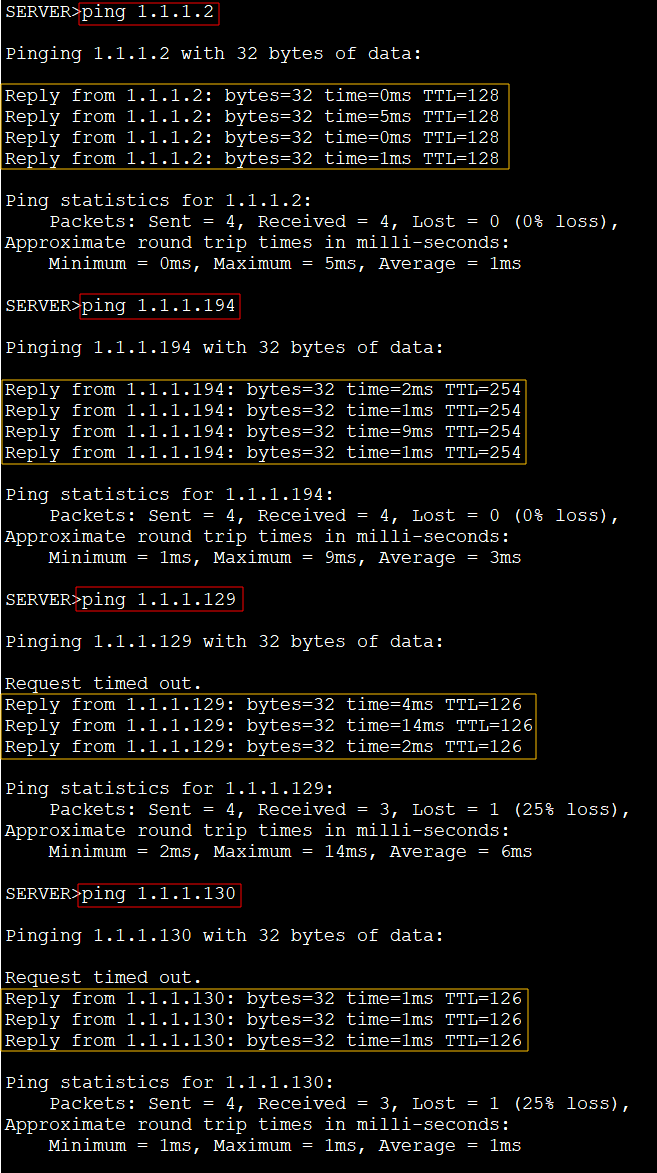
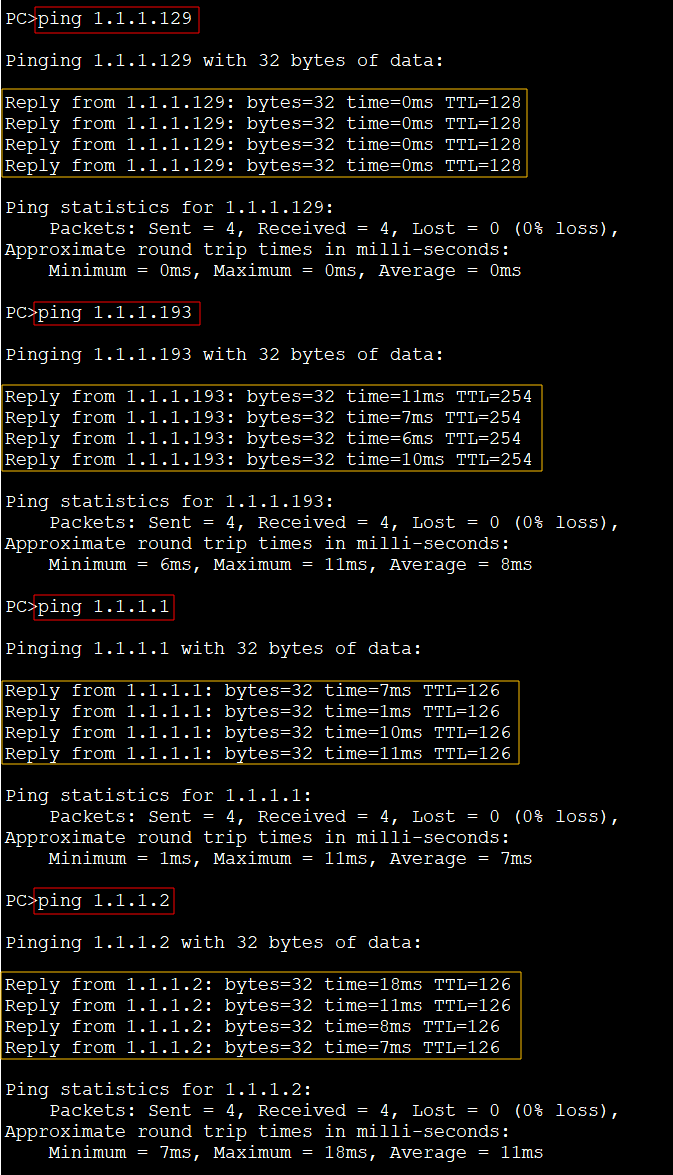
Reference.
네트워크 구성 문제 출처 : https://virtualtech.tistory.com/193?category=680289
IP Address와 Subnet -5. Subnet의 문제1,2
음 Subnet 문제와 PKA 파일 올려 드립니다. 차분히 한 번 풀어 보세요! 1. 1개의 네트워크 2. 3개의 Network 100%를 향하여......~
virtualtech.tistory.com
'Network' 카테고리의 다른 글
| 06. Network : Switch (0) | 2022.04.19 |
|---|---|
| 05. Network : 패킷 구조 (ARP) (0) | 2022.04.19 |
| 04. Network : Subnet 문제 (0) | 2022.04.19 |
| 02. Network : Subnetting (0) | 2022.03.15 |
| 01. Network : 개념 및 OSI 7계층 (0) | 2022.03.15 |


